There is fundamental issue with how we talk about Date. For example, my date is in Central Time or for this Location my Date is in Eastern Time. As we all know, Date is milliseconds representing GMT time & String value we see in Debugger or Logs is just String representation of Date with respect to some TimeZone.Here is what i recommend for Date usage with ADF, some of which can very well apply to other frameworks as well.
1. Don't offset date value for Persistence
JDBC driver will transform value of Date is Server's Default TimeZone for storing in Table Column. At times, we try to offset value of Date, so that when JDBC Driver creates String representation using Server's Default TimeZone, it looks like GMT for example. This is clever, but not a good idea.
This approach can cause issues with Queries. It will also not represent values correctly on screen components. You can workaround these issues, but that's extra work that can be avoided, by accepting the fact that Date will be stored in Server's Default TimeZone.
2. Do not specify Date Format on Control Hints for Entity or View Object attributes
ADF does a good job of providing Control Hints that can be set on Business Components, but in this case I would recommend not setting any Format for Date on Entity and View Object. I have seen issues with Control Hints related to Date Format and more importantly it makes sense to control this based on User's Preferences / Locale.

3. Create Session Scope variables for TimeZone & Date Format
Using Phase Listener, create Session Scope values for TimeZone and various Date & Time formats. You can read this values from User's Preference or derive it using any other data store.
These can be used in UI pages with af:convertDateTime as shown below.

4. Specify TimeZone in trinidad-config.xml

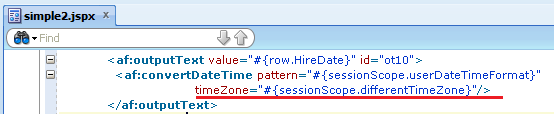
5. Specify Pattern on af:date Specify different TimeZone if necessary on af:date
If you want to display particular Date value in a different TimeZone, you can indicate that on af:convertDateTime. For example, Delivery Date would make sense to be displayed in TimeZone of Delivery Location.